
Discover SmartFill
Automatically generate compliant reports from the audio and video data captured during your XpertEye sessions.
Section titled “Automatically generate compliant reports from the audio and video data captured during your XpertEye sessions.”How does it work?
Section titled “How does it work?”- Tap “Create a Report.”
- Choose your camera and microphone, and preview your setup.
- Select the report template you need.
- Hit Start to begin your session — video recording starts automatically.
- When the session ends, your report is automatically generated.
Session will be named with the name of the template and hh:mm:ss
ex: “Safety incident report 18:01:14”
Hands-Free on Smart Glasses: “Create Report” Voice Command
Section titled “Hands-Free on Smart Glasses: “Create Report” Voice Command”On smart glasses, you can now say “Create report” to get started.
Select a template with a voice command (like “Select report 1”).
Your session begins and recording starts automatically. Display and navigate through your template using voice commands.
Edit & Export with Ease
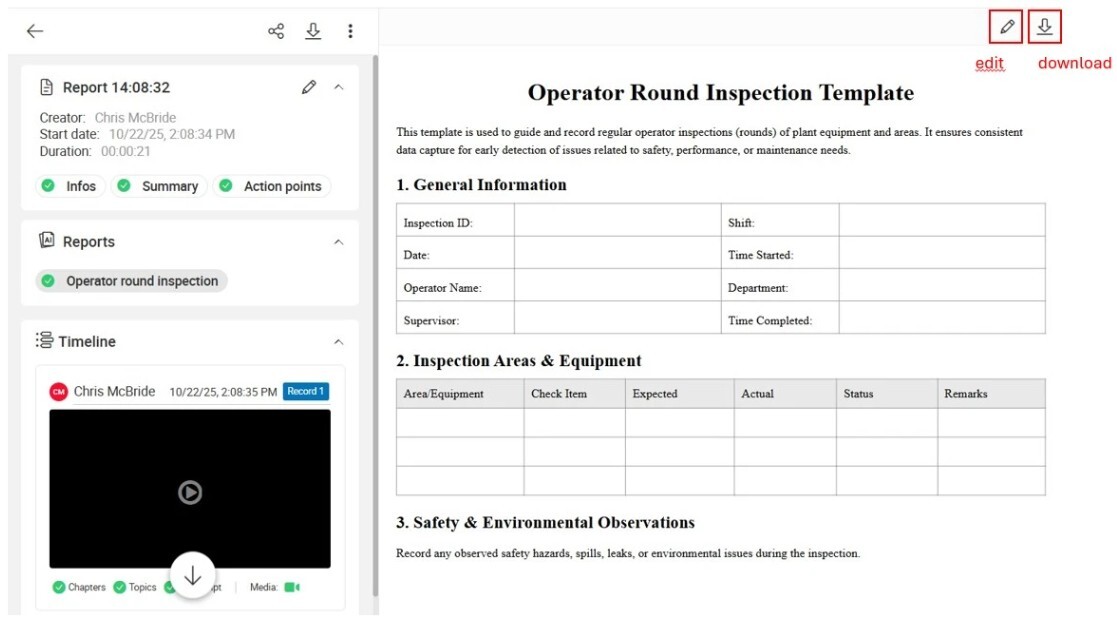
Section titled “Edit & Export with Ease”Once a report is generated, session owners can edit AI-generated content, including:
- SmartFill reports
- Summaries
- Action points
- Custom prompt results
After editing, the updated version automatically replaces the original. All participants can download the generated report (PDF format).
⚠️ Note:
- Users of a company can only access templates belonging to their company.
- To requests ingestion of a new document for the SmartFill feature, please contact us